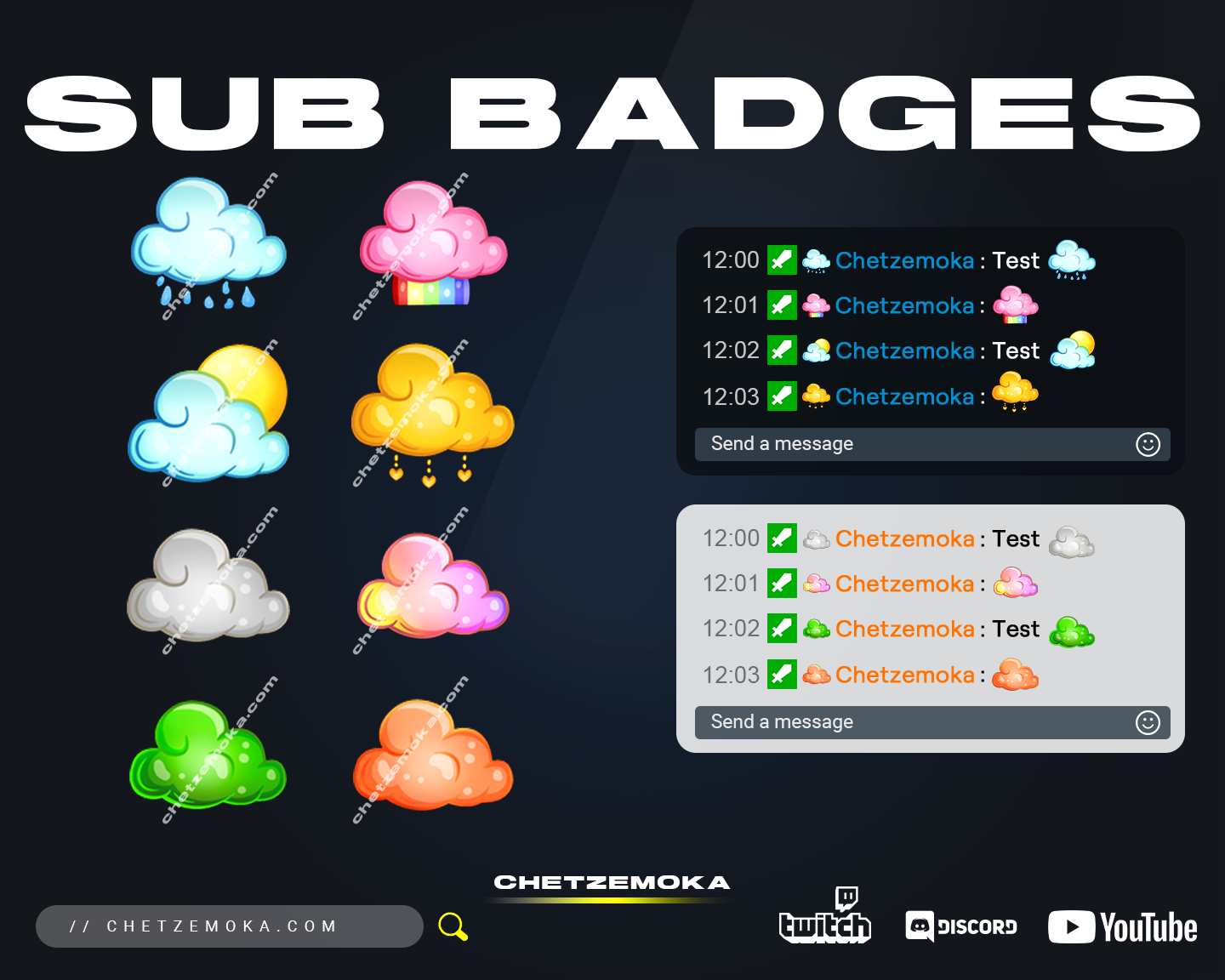
Cloud Sub Badges

7.00

Instant Download
Available instantly in your account and via email

Installation guide
With each product, you will receive an installation guide for the given asset.

Works on white & dark design
Fits perfectly for both color schemes.

Cloud Sub Badges

Bring a calm, dreamy aesthetic to your stream with Cloud Sub Badges, a soft and stylish set of subscriber badges designed to elevate your Twitch or Kick channel. These floating cloud icons add a gentle and relaxing mood to your community, perfect for cozy streamers, chill gamers, outdoor adventurers, or anyone who wants a clean and uplifting visual theme.

Each cloud badge features subtle shading, soft edges, and tier-based color variations that help your subscribers stand out in chat. Whether your channel leans into comfort, fantasy, or peaceful vibes, these Twitch Sub Badges will make your community feel right at home.

What is included in Cloud Sub Badges

The Cloud Sub Badges pack comes with everything you need to instantly upgrade your subscriber rewards. All graphics are clean, polished, and optimized for streaming platforms.

Inside, you will receive:

  • A full set of cloud-themed subscriber badges for multiple subscription levels

  • Transparent PNG files in all required sizes: 112×112, 72×72, 36×36, 28×28, and 18×18

  • A cohesive art style that stays clear even at very small resolutions

  • Organized folders to help you upload your badges quickly and effortlessly

The designs are crafted to look smooth, friendly, and highly readable, giving your channel a professional yet relaxing presentation.

How to use sub badges on Twitch or Kick Platform

Adding your Cloud Sub Badges to your streaming platform is simple and quick.

For Twitch:

  1. Go to your Creator Dashboard.

  2. Open the Viewer Rewards section and select Subscriber Badges.

  3. Upload the PNG files to each subscription tier.

  4. Save your changes and refresh your channel.

For Kick:

  1. Open your Channel Settings.

  2. Navigate to the Subscriptions or Badges area.

  3. Upload your cloud badges to their matching tiers.

  4. Save and refresh to activate them.

Your new cloud badges will begin appearing next to your subscribers in chat instantly, giving your channel a soft and polished upgrade.

Full compatibility with Discord

Your Cloud Sub Badges also work perfectly on Discord. You can use them as role icons, custom emoji-like markers, or exclusive perks for your most loyal community members. With clean transparent PNG files and crisp visual quality, they look great on both desktop and mobile.

This makes it easy to keep your branding consistent across multiple platforms.

Cloud Sub Badges are designed for clarity at small sizes

Chat badges are tiny. That is why each Cloud Sub Badge is carefully designed with strong silhouettes, clean outlines, and simplified shapes. Even at the smallest size of 18×18 pixels, the cloud theme stays readable and visually appealing.

No matter how busy your chat becomes, your subscribers will stand out with soft, eye-catching badge icons.

Cloud Subscriber Badges are delivered in multiple sizes with transparent PNGs

You will receive all standard badge sizes used by Twitch and other streaming platforms:

  • 112×112 px

  • 72×72 px

  • 36×36 px

  • 28×28 px

  • 18×18 px

Every file comes as a transparent PNG, which means you can place them into Twitch, Kick, Discord, YouTube, or community apps without any editing. Upload and go.

Cloud Sub Badges for commercial use

When you purchase Cloud Sub Badges, you receive full commercial usage rights. You can use these badges across all your streaming and social platforms without extra licensing or attribution.

Perfect for Twitch, Kick, Discord, YouTube, overlays, banners, thumbnails, and brand graphics.

Instant digital download

After completing your purchase, you will receive instant access to download your Cloud Sub Badges. A download link appears right on the confirmation page, and a backup link will be sent to your email.

You can refresh your channel with beautiful cloud-themed badges in just a few minutes.

What Our Customers Say

Reviews are not verified by the seller.

Reviews are not verified by the seller.